


Memorial Slideshow Photo Order: A Guide to Arranging Photos
There is a particular kind of stillness that settles over a room when someone spreads hundreds of family photos across a table and realizes they have to choose. Maybe you are sitting with shoeboxes of printed snapshots, scrolling through years of phone camera rolls, or both at once, and the weight of it feels enormous. Getting the memorial slideshow photo order right is not about perfection. It is about building a sequence that lets the people who loved your family member feel the shape of a real life, not just see a pile of pictures.
The good news is there is no single right way to arrange these memories. Whatever structure you choose, the care behind the effort will show in every slide. What a clear framework does is remove the paralysis. It gives you a path to walk so you are not staring at a stack of photos wondering where any of them belong.
This guide walks through the most effective approaches, chronological arrangements, thematic groupings, and milestone based structures, along with the pacing and grouping decisions that turn a stack of photos into a tribute people remember. Many families choose to build that sequence into a personalized video tribute, since having a finished, professionally paced presentation takes one more task off an already difficult week.
Choosing the Right Memorial Slideshow Photo Order
The first decision you face is not which photos to include, it is what kind of story you want to tell. That choice shapes everything else. The sequence of images is what creates the emotional journey for everyone watching. A random collection of photos, even beautiful ones, can leave an audience feeling unmoored. A deliberately ordered sequence carries people through grief and memory together and gives them something to hold onto.
Think about how your loved one moved through the world. A patriarch who built a family over six decades, who watched grandchildren grow and marked every milestone with a camera in hand, his story lends itself naturally to a chronological structure that mirrors the arc of a long, full life. Someone who was defined less by a linear timeline and more by a consuming passion, such as a woman who spent forty years teaching and coaching, might be better honored by a thematic arrangement that places her deepest commitments at the center, regardless of when the photos were taken. Matching the structure to the personality is an act of knowing someone well enough to tell their story honestly.
Chronological vs. Thematic: Two Starting Points
A chronological arrangement is the most intuitive structure for most families, and its power comes from its simplicity. It mirrors the way life unfolds: infancy, childhood, school years, young adulthood, marriage, career, and the quieter years that follow. Guests of every age can follow this kind of story without effort, because it maps onto a shape of life that everyone recognizes.
A thematic arrangement works differently, and for certain lives it works better. Rather than organizing by time, it groups photos by subject, the roles your loved one played, the passions they carried, the communities they shaped. A dedicated outdoorsman might have his story told in chapters: the hunter, the fisherman, the man who taught his children to read a river. Thematic slideshows are also a practical solution when the photo collection is uneven, since this kind of structure lets you build full sections without the gaps becoming obvious.
Memorial Slideshow Photo Order at a Glance
Here is a quick side by side look at the three most common structures families choose between, and what to watch for with each one.
| Structure | Best For | Watch For |
|---|---|---|
| Chronological | Long, well documented lives with photos spanning every decade | Can feel thin if certain decades are sparsely photographed |
| Thematic | Lives defined by a role, a passion, or a community | Needs clear visual or musical cues between sections |
| Hybrid | Long, multifaceted lives where timeline and passions both matter | Takes more planning time to balance both halves |
If you are working through a large collection and feeling overwhelmed, start by removing technically poor images, anything blurry, poorly lit, or so unclear it would need a long explanation. From there, look for duplicates and near duplicates, keeping only the strongest version of a repeated moment. For a closer look at choosing the strongest photos for a tribute, that process works the same way whether the result is a printed program or a full slideshow. What remains is a more honest, more focused collection that serves the story far better than a photo dump ever could.
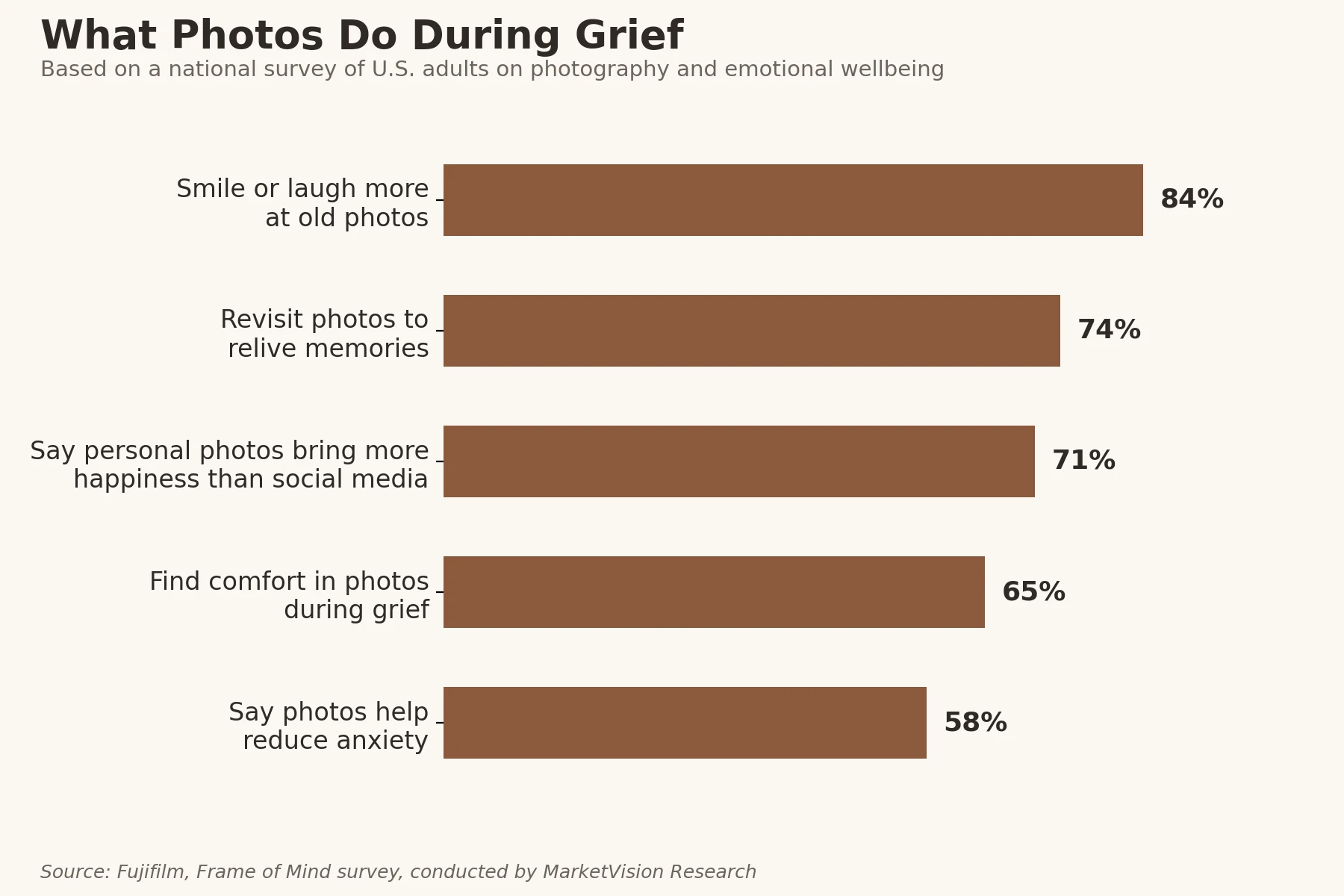
Curating with intention matters because photographs carry more emotional weight than people often expect going in. A national survey on photography and emotional wellbeing found that most people actively turn to old photos for comfort during hard moments, not only for nostalgia on easy days.
What Photos Do During Grief
Source: Fujifilm, Frame of Mind survey, conducted by MarketVision Research
Creating a Natural Flow From Start to Finish
A slideshow that flows well feels like a book with distinct chapters. There is a beginning that welcomes guests and sets the emotional tone, a middle that explores the depth of relationships and experiences, and an end that offers something close to peace, a sense that a full life was lived and that its meaning will carry forward. The beginning should ease people in softly, perhaps with a portrait or a favorite photo that captures your loved one’s spirit at its most recognizable. The middle is where the story deepens. The end should feel like an exhale, a final image or sequence that leaves guests with warmth rather than raw grief.
Pacing, Transitions, and Music
Pacing matters as much as order. Transitions between slides should be simple. A soft cross fade is almost always the right choice, because it keeps the focus on the person’s face and the story the image is telling. Flashy digital effects pull attention toward the technology and away from the memory, which is the opposite of what a tribute needs. Music also shapes the pace in ways that are easy to underestimate. A slow, reflective piece will naturally encourage longer pauses between slides, while an upbeat song from your loved one’s favorite era might carry a livelier section forward.
- Group by relationship. Cluster photos of immediate family, childhood friends, and colleagues into cohesive segments so the narrative feels connected rather than scattered.
- Balance the emotional tone. Alternate between deeply reflective images and lighter, candid moments so the audience has room to breathe, smile, and grieve at a human pace.
- Use music as a structural guide. Align photo transitions with the natural rhythm and tempo of the background music.
- Maintain steady pacing. Keep each slide on screen long enough to be appreciated fully, but not so long that momentum stalls.
Preparing and Digitizing Your Photo Files
On the technical side, preparing files correctly prevents the kind of last minute venue stress no family should have to face. Following official photo preparation guidelines before you finalize files can help scanned physical photos and digital images display clearly on a large screen. Because projector models and venue setups vary widely, the specific file formats, resolution settings, and aspect ratios that work best for your particular venue are details worth confirming directly with your funeral home or venue coordinator.
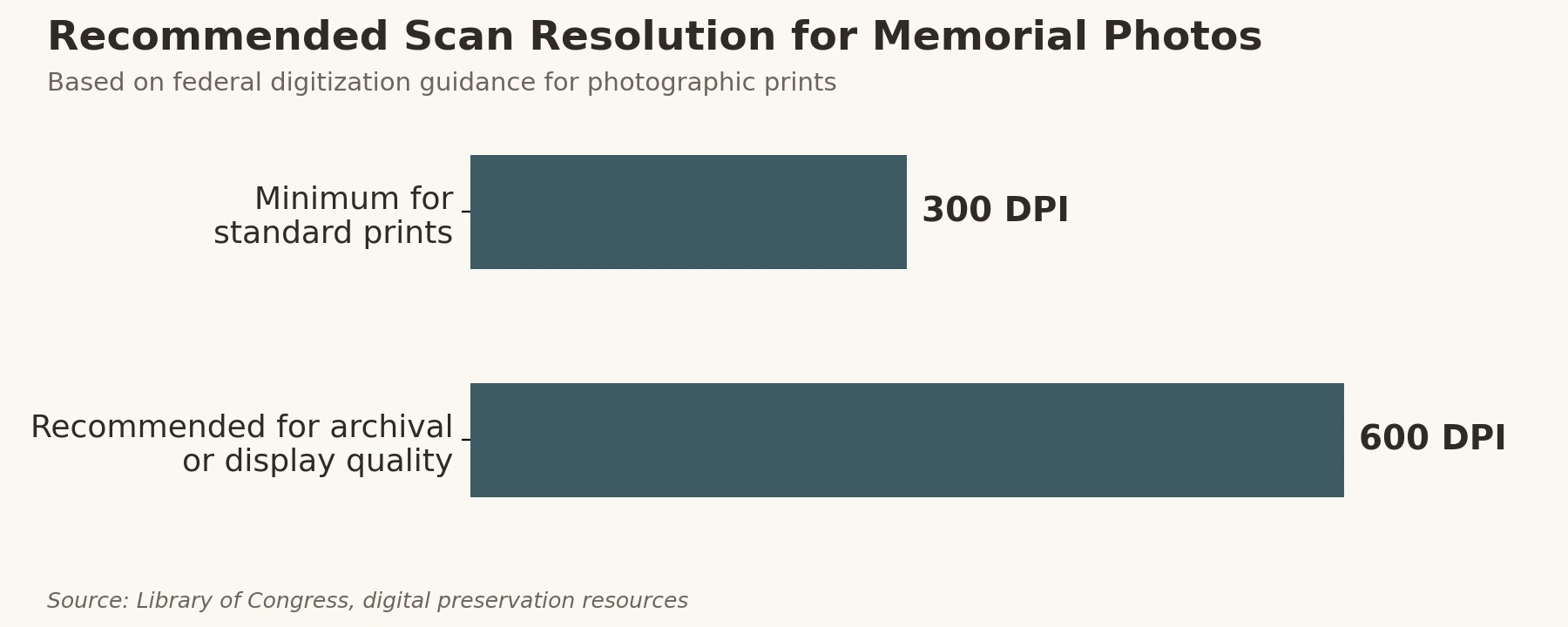
For most families, the quickest starting point for digitizing old photos is a mobile scanning app designed to handle the glare and distortion that comes from photographing printed photos with a smartphone. For higher quality, a flatbed scanner produces sharper results that hold up well on a large venue screen, and archival specialists recommend scanning at a resolution that scales with how the image will ultimately be used.
Recommended Scan Resolution for Memorial Photos
Source: Library of Congress, digital preservation resources
If you are working with a very large volume of physical photos, such as albums spanning multiple decades, a professional scanning service can save significant time and deliver consistently high resolution files, which is worth considering if the slideshow will be projected in a large space.
The Four Movements Framework for a Complete Life Story
For families who want a tribute that honors every dimension of a long, full life, a structured narrative approach can make the difference between a slideshow that feels complete and one that feels like it is still searching for its shape. One framework that works particularly well organizes the presentation into four distinct emotional movements.
If you are still weighing whether a full tribute video fits your family’s plans, it helps to understand what a tribute video actually captures before you commit to a structure.
Arrival, Life Story, Character, and Farewell
The first movement, Arrival, welcomes guests and sets the tone, typically with a portrait or a beloved image that introduces the person being honored. The second movement, Life Story, moves through chronological milestones: childhood, education, marriage, career, and the major turning points that defined the arc of their years. The third movement, Character and Passions, shifts from timeline to theme, exploring the hobbies, values, and personality traits that made your loved one who they were. The fourth movement, Farewell, closes the tribute with images of legacy: grandchildren, final gatherings, quiet moments of peace, and a final image that feels like a peaceful goodbye.
What makes this four movement structure effective is that it allows a family to hold both the chronological and thematic approaches at the same time, rather than choosing between them. The Life Story movement gives the tribute its linear backbone, while the Character and Passions movement gives it depth and personality. Together, they prevent the slideshow from becoming either a dry timeline or a disconnected collection of themed images. Families who have used this kind of structure often describe watching it as feeling like the person was truly seen, not just documented, but understood.
Grouping Family, Friends, and Milestone Photos
How you cluster photos within any section of the slideshow shapes how the audience experiences the relationships your loved one held most dear. A few grouping strategies consistently create a coherent, emotionally resonant flow.
- The Inner Circle. Place photos of immediate family, spouses, children, and grandchildren in prominent, dedicated segments. These relationships defined the daily texture of your loved one’s life and deserve space at the center of the tribute.
- Generational Milestones. Group photos that show the passage of time across generations, your loved one as a child, then as a parent, and finally as a grandparent. This kind of sequence carries a quiet power that audiences feel without needing it explained.
- Friendships and Community. Dedicate a section to lifelong friends, travel companions, neighbors, and colleagues. A life is measured not only by family but by the breadth of the connections a person chose to maintain.
- Portraits and Candids. Mix formal portraits with candid snapshots of everyday life to capture the full, unposed personality of the person you are remembering, the posed holiday photo and the blurry kitchen table laugh both belong.
Navigating Complex Family Dynamics
Navigating complex family dynamics is one of the more delicate aspects of building a memorial slideshow, and it is worth approaching with intention rather than avoidance. In families touched by divorce, blended relationships, or estrangement, the goal is to keep the focus on your loved one’s direct connections, specifically the bonds that were real and present in their life, rather than on the family’s internal tensions. Every key relationship that mattered to your loved one deserves to be represented with dignity. When in doubt, ask yourself whose presence in a photo would have made your loved one smile, and let that be your guide.
On the practical side, the ideal number of photos and the total running time for a slideshow shown during a formal service are details worth confirming with your service coordinator, since venues and service formats vary. A useful general guideline is to aim for a length that corresponds roughly to two or three songs, long enough to tell the story fully, yet short enough to hold the audience’s attention and leave them wanting to linger in the memory.
Frequently Asked Questions
How do I choose the very last photo for a memorial slideshow?
The final photo carries more emotional weight than almost any other image in the presentation, because it is the last impression guests take with them when they leave. Choose an image that captures your loved one’s true spirit, often a photo of them smiling, looking toward the camera, or fully absorbed in something they loved. Many families find that a photo of their loved one looking at peace, waving, or sharing a genuine laugh with someone they cherished makes for a deeply comforting close. Avoid images that feel sad, clinical, or out of context. The last slide should feel like a gift, offering a final glimpse of the person at their most themselves.
What are the legal rules regarding music licensing for funeral slideshows?
Music licensing is a genuinely important consideration, particularly when the slideshow is played in a public venue or shared online after the service. Your funeral home or venue coordinator can speak directly to whether their facility holds a blanket public performance license through organizations such as ASCAP, BMI, or SESAC that covers music played during services. If the venue does not have that coverage, or if you plan to upload the slideshow to a streaming platform or share it on a memorial website, using royalty free or public domain music is the safest path. Many royalty free music libraries offer tracks that are genuinely beautiful and appropriate for a tribute, so this is not a compromise, it is simply a different sourcing approach.
What is the easiest way to digitize old physical photos for a slideshow?
For most families, the quickest starting point is a mobile scanning app built to handle the glare and distortion that comes from photographing printed photos with a smartphone. These tools automatically remove glare, crop the image, and produce a clean digital file. For higher quality, a flatbed scanner set to at least 300 DPI produces sharper results that hold up well on a large venue screen. If you are working with a very large volume of physical photos, such as albums spanning multiple decades, a professional scanning service can save significant time and deliver consistently high resolution files.
Should I include text slides or captions in the memorial video?
Text slides serve a real purpose when used with restraint. They work best as chapter markers, brief transitions that signal a shift in the story, such as “The Early Years” or “A Life of Adventure,” rather than as explanations of individual photos. Captions on specific images should be kept minimal, a year, a location, or a name is usually enough to provide context without pulling the viewer’s attention away from the image itself. Whatever font you choose, make it large, clean, and easy to read against the background, and give each text slide enough time on screen for the slowest reader in the room to finish it comfortably before the next image appears.
How do I handle photos of deceased relatives within the slideshow?
Including photos of family members who passed away before your loved one can be one of the most quietly moving choices in the entire tribute. It places your loved one within a larger story of family and belonging, and for many guests it carries the comforting suggestion of reunion. Group these images with care, placing them near the beginning of the slideshow as part of a family heritage section, or woven into a generational milestone sequence, so they feel intentional rather than incidental. Handle every image with the same care and respect you bring to the rest of the tribute, and let the depth of those bonds speak for itself.
Let These Photos Tell the Full Story
Organizing a memorial slideshow is one of the most personal things you can do in the days following a loss. There is no formula that replaces knowing your loved one, their humor, their tenderness, and their particular way of being in the world. Whether you choose a chronological structure, a thematic arrangement, the four movement framework, or some combination of all three, what matters most is that the story you tell feels true. Take your time. Gather the photos slowly. Let the structure serve the person, not the other way around.
From memorial stationery to digital tribute resources, our full collection of memorial keepsakes is designed to reduce the logistical weight so you can focus on what this time is really for.
If you would like support building a tribute that reflects this level of care, reach out to our compassionate team at 323-290-2555, Monday through Friday from 9 am to 5:30 pm, or call Tech Support at 888-349-2530 on weekends. We are glad to walk alongside you.


